

Market share, Core Web Vitals, real three-year cost, and data ownership, compared platform by platform, so you can stop guessing which one fits your business.
You’ve probably typed “WordPress vs Wix vs Squarespace” into Google and landed on a listicle that hedges every point and ends with “it depends on your needs.” That’s not an answer. That’s a shrug.
This guide is the specific version. It breaks down WordPress vs other platforms for your business website across every dimension that actually determines which one serves a growing business: market share and ecosystem, technical performance, ecommerce capability, security burden, true ownership, real three-year cost, SEO depth, AI readiness, design flexibility, and accessibility, with a source attached to every number.
The stance: for a business planning to grow content, run SEO as a real channel, and control its own site long-term, WordPress is the stronger default. Not because it’s most popular by inertia, but because of what the data below shows about ownership, cost, and ceiling. Wix and Squarespace remain the right call in specific, narrow situations, covered honestly in the Where Each Platform Actually Wins section.
Market Share: Who’s Actually Building What
WordPress powers 40.7% of all websites and 59.0% of the market among sites with a known CMS, according to W3Techs’ live tracking, as of 20 August 2026. That’s roughly eight times the share of its nearest competitor.
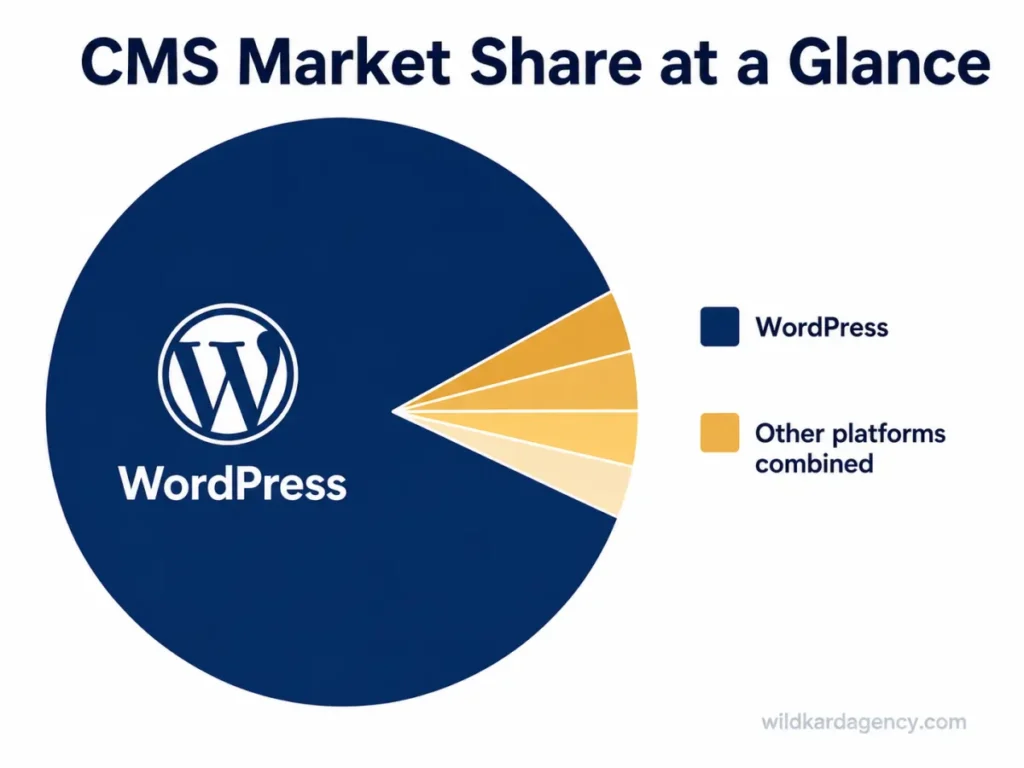
WildKard builds every WordPress site on Elementor, the page builder running on 31.5% of all WordPress sites, more than any competing builder, per the same W3Techs data.
Market share isn’t standing still, though. Wix grew 32.6% year-over-year in 2025, the fastest growth rate of any major CMS, according to Colorlib’s analysis of W3Techs data, the same period in which WordPress’s overall share declined for the first time in over 20 years.
Market share explains popularity. It doesn’t explain performance, and performance is where the real gap between these platforms shows up.
Core Web Vitals: The Platform Speed Gap Nobody Talks About
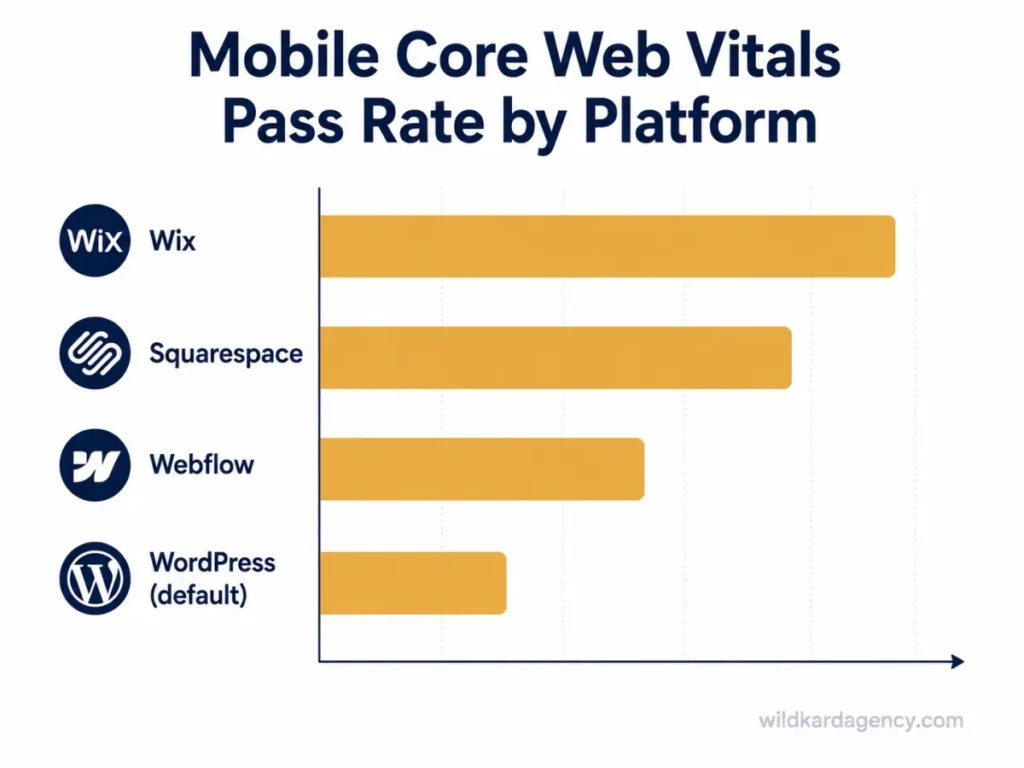
On mobile Core Web Vitals pass rates from a May 2026 HTTP Archive crawl, the ranking runs opposite to market share.
| Platform | Mobile CWV Pass Rate |
| Wix | 80.7% |
| Squarespace | 70.2% |
| Webflow | 68.9% |
| WordPress (default install) | 49.3% |
That 49.3% figure measures the median WordPress install, not what a properly configured one can do. A hand-coded stack on a modern framework can reach roughly 92% Core Web Vitals pass rate, according to Moydus’ 2026 comparison, and the same ceiling is available to WordPress with the right theme, caching, and hosting. Wix and Squarespace hit their numbers by default because there’s a lower ceiling to hit; WordPress starts lower by default but has no ceiling at all.
Ecommerce Capability: WooCommerce vs Built-In Store Builders
If the business sells anything online, the platform comparison changes shape entirely. By active store count, Store Leads’ live 2026 tracking puts WooCommerce first with 4,091,786 active stores, ahead of Shopify’s 3,056,032 and well ahead of Wix’s 974,634.
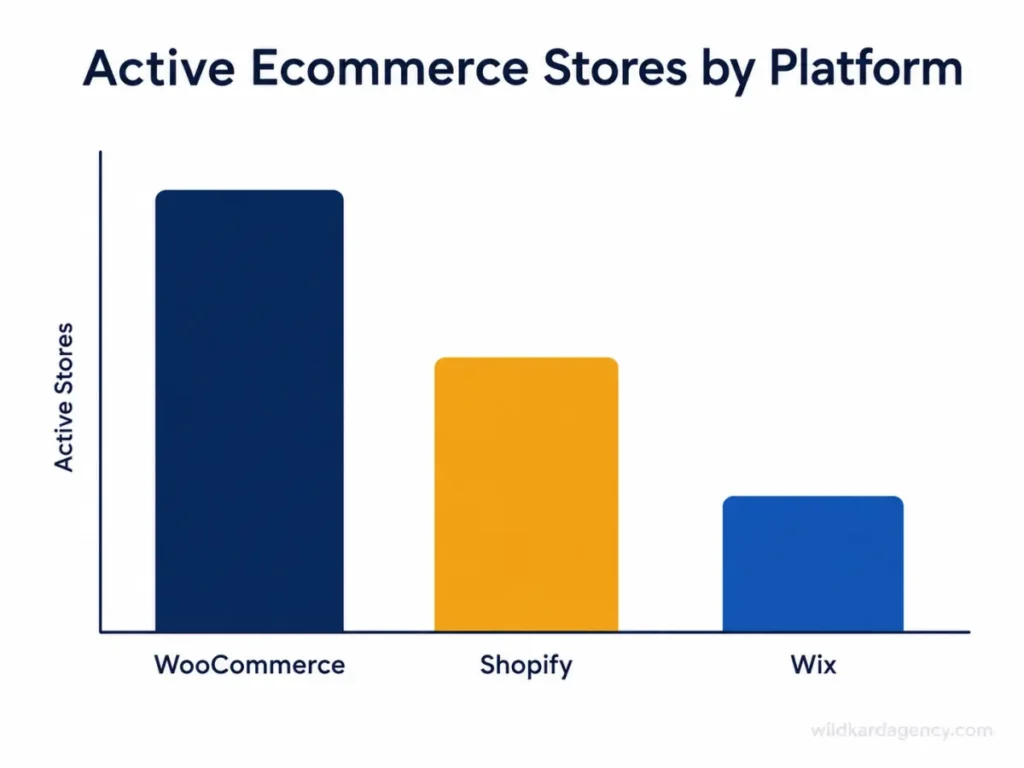
Scale is only part of the story. Wix and Squarespace bundle hosting, payments, and store management into one system, which is genuinely faster to launch. WooCommerce is modular instead: free at its core, with extensions layered on for whatever the store actually needs, from subscriptions to freight-based shipping rules.
For a store staying under roughly 50 products with straightforward requirements, either approach works well. Past that point, once subscriptions, B2B pricing tiers, complex inventory, or a custom checkout flow enter the picture, WooCommerce is significantly more capable, because there’s no built-in ceiling on what an extension can add.
Security: Who’s Actually Responsible When Something Goes Wrong
This is the trade-off nobody puts in the headline. Patchstack’s 2026 security report documented 11,334 new WordPress vulnerabilities in 2025, a 42% jump year-over-year. The critical detail: 91% of those vulnerabilities were in plugins, not WordPress core, which had only 6.
Hosted builders remove this decision entirely; Wix and Squarespace patch their own infrastructure, and the business never touches it. WordPress hands that responsibility to whoever runs the site, along with everything that comes with it: 46% of disclosed vulnerabilities had no patch available at the moment they were disclosed, and the median time from disclosure to first exploitation attempt is roughly 5 hours.
None of this makes WordPress unsafe by default. It makes WordPress’s security a function of plugin discipline, not platform choice, an ongoing responsibility rather than a one-time setup step, and one more item that belongs in the total cost of ownership conversation above, not a separate one.
What You Actually Own: Data Ownership and Lock-In
This is where the platforms diverge most, and where it matters most three years in. Refact’s 2026 comparison puts it plainly: WordPress lets a business take its media library and database and move to any host or developer at any time. Hosted builders don’t offer that.
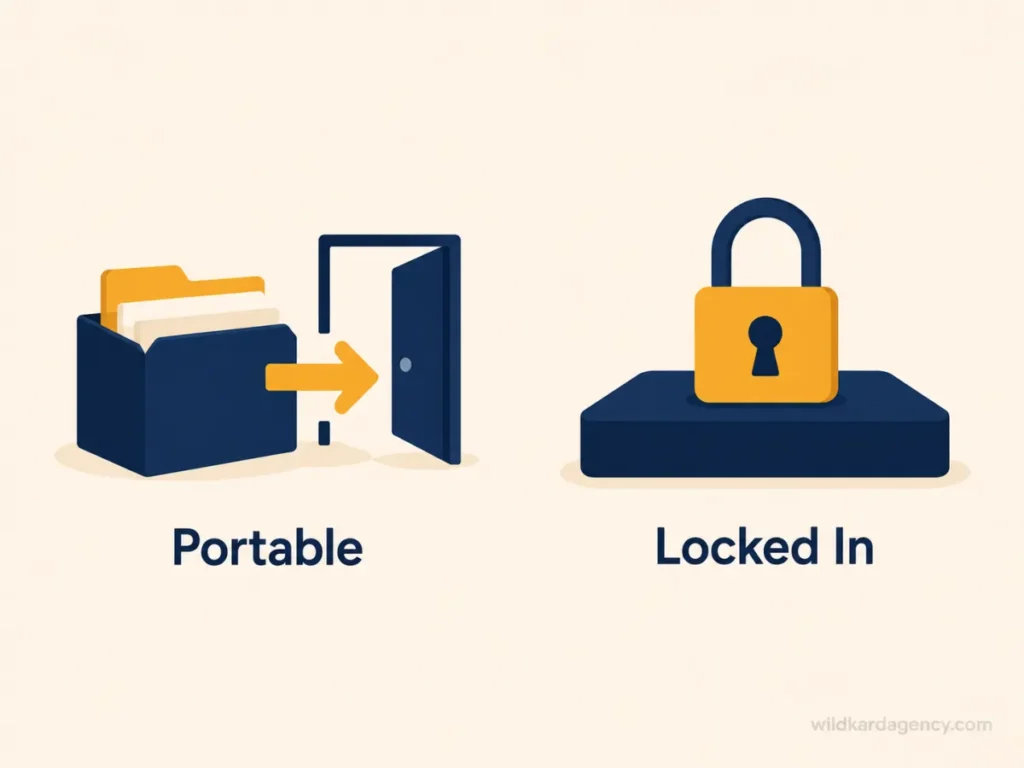
On Wix, according to Mojo Agency’s analysis, a business owns its content, meaning the text and images uploaded, but not the site structure, the template, or the database configuration, and has no way to take the site elsewhere if pricing or policy changes.
For a business that expects to still exist in three years, this isn’t a minor technical footnote. It’s the difference between a site that’s an asset and a site that’s a rental.
The Real Three-Year Cost
Launch price is the number every comparison leads with. It’s also the least useful number for a business planning past year one.
| Platform | Typical Launch Cost | Typical Ongoing Cost |
| WordPress (self-hosted) | $500-$5,000 (DIY to freelancer build) | $30-$150/month: hosting, domain, plugins, maintenance |
| Wix | Included in plan, no separate build cost for DIY | $17-$159/month by tier; Business Elite runs roughly $1,908/year before premium apps |
| Squarespace | Included in plan, no separate build cost for DIY | $16-$99/month by tier, billed annually |
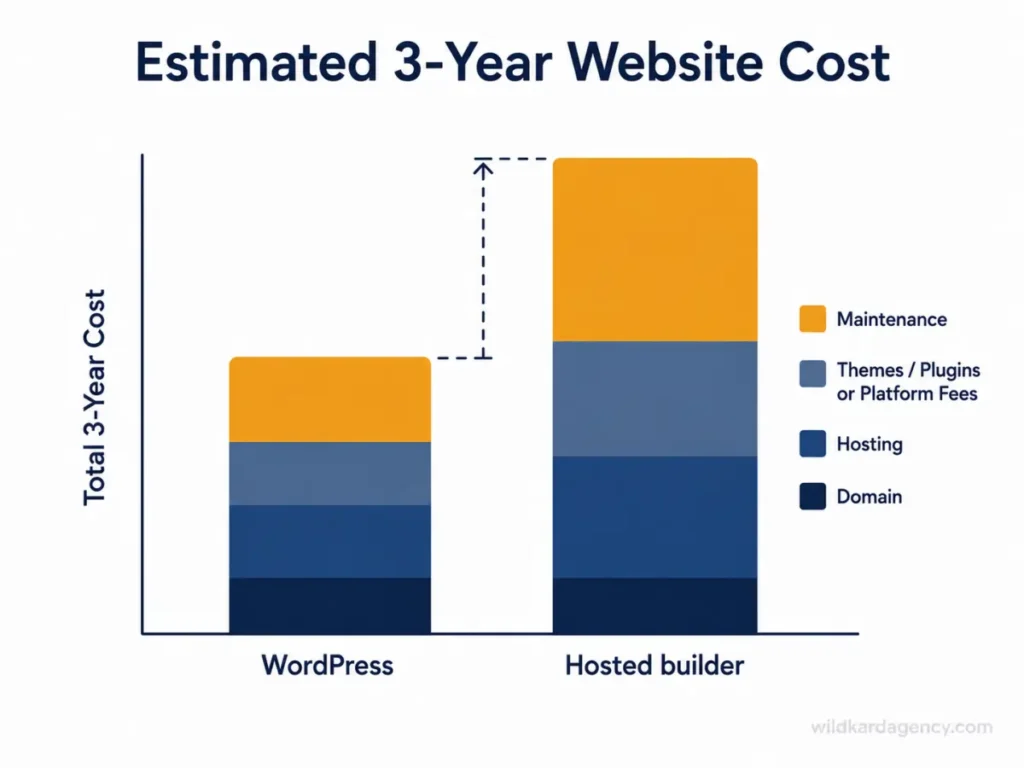
Run those ranges over three years and Assertivlogix’s 2026 comparison puts WordPress $4,000 to $10,000 ahead once hosting, plugins, and Wix’s bundled annual fees are all accounted for, a gap that widens further for any business adding ecommerce, since Wix layers payment processing fees on top of its plan price.
SEO Control: How Deep Each Platform Actually Goes
With plugins like Yoast, RankMath, or Schema Pro, WordPress gives complete control over meta titles, canonical URLs, structured data, breadcrumbs, XML sitemaps, hreflang tags, and redirect management, according to BrightColumn’s SEO comparison, the full technical layer covered in our guide to Google’s first page.
Wix and Squarespace handle the basics competently. Titles, descriptions, alt text, and clean URLs work without effort. What’s missing is granular schema control and the ability to inspect and tune technical SEO past a certain depth, a ceiling that starts to matter the moment a business’s SEO strategy goes beyond basic on-page optimization.
AI and GEO Readiness: Which Platform Actually Gets Cited
For AI-search readiness specifically, SquareRanked’s 2026 analysis concludes WordPress is the slightly better platform, driven by root-file freedom, real llms.txt support and an editable robots.txt, and plugin-level schema flexibility that closes the gap hosted builders open by default.
The same analysis is careful not to overstate this: what AI engines actually reward, clear passage structure, source density, and clean entity signals, is platform-neutral. Neither WordPress nor Squarespace unlocks AI citations automatically. LaunchCodex’s 2026 comparison notes WordPress leads specifically because plugins like RankMath and AIOSEO let a site owner attach any schema type to any page, which matters more as AI Overviews and answer engines lean harder on structured data to decide what to cite.
The honest framing: the platform sets the ceiling on how much AI-readiness work is possible. The content and structure still have to do the actual work of earning the citation, which is where our own GEO guidance goes deeper than platform choice alone.
Design Flexibility and the Customization Ceiling
Squarespace’s greatest strength doubles as its limitation. Per WPPoland’s 2026 breakdown, its template constraints make it very hard to build an ugly website, and just as hard to build something highly unique or functionally complex. Its layout engine has no equivalent to WordPress’s ability to conditionally display elements based on user behavior or data.
Template count reflects the same trade-off. Wix ships roughly 2,000+ templates and Squarespace closer to 180, both fixed catalogs. WordPress has no catalog ceiling at all: over 30,000 free themes, plus fully custom builds, because the underlying code is open to whoever’s building the site.
For a business that wants a professional site fast and doesn’t need anything unusual, that ceiling never gets reached. For a business planning bespoke booking flows, membership logic, or anything past a standard template’s assumptions, it gets reached quickly.
Accessibility Out of the Box
The 2026 WebAIM Million report, cited in Refact’s comparison, found Wix home pages averaged 33.3 detectable accessibility errors, roughly 40% below the sample mean. WordPress averaged 52.8.
The gap isn’t really about which platform’s team cares more. Wix’s constrained editor gives site owners fewer opportunities to introduce bad markup or broken ARIA labels in the first place. WordPress’s openness that enables custom functionality is the same openness that allows accessibility mistakes to slip through unnoticed, unless someone on the build is specifically checking for them.
This is a real point in favor of hosted builders for a business with no one dedicated to accessibility review. It is not an argument that WordPress can’t be built accessibly, only that accessibility on WordPress is a deliberate practice rather than a platform default.
Where Each Platform Actually Wins: A Decision Framework by Business Type
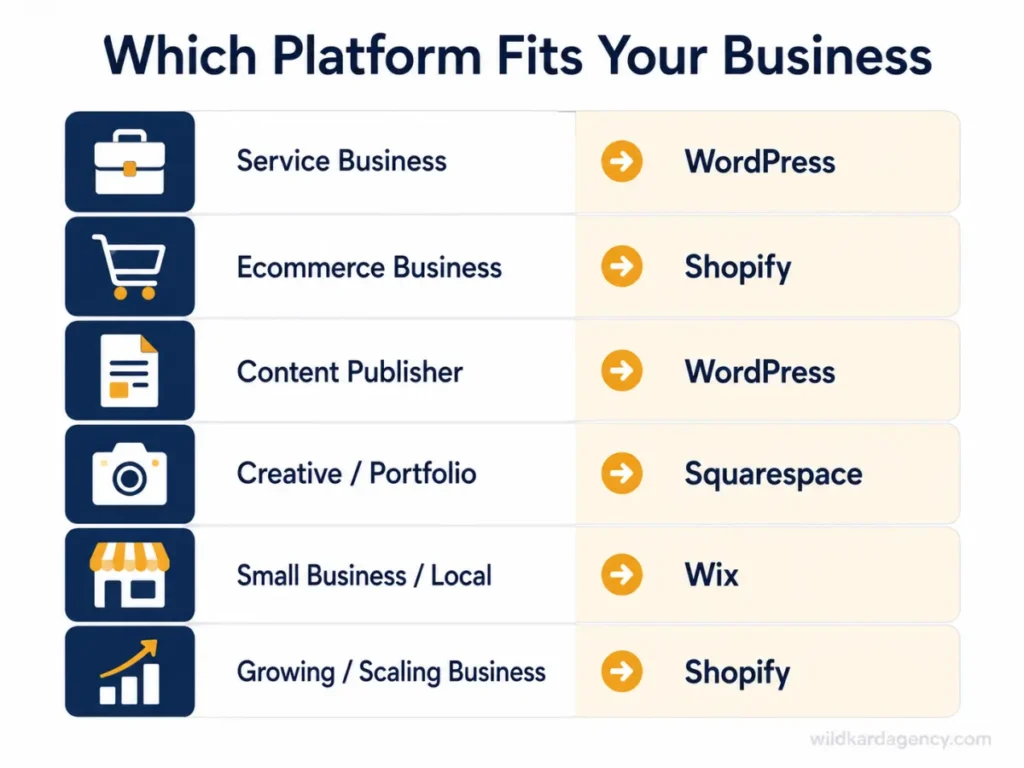
- Service business (consulting, agencies, professional services): WordPress. Content and SEO are usually the primary growth channel for this category, and that’s exactly where WordPress’s ceiling advantage compounds fastest.
- Ecommerce store, under ~50 products: Wix or Squarespace are legitimate choices here. Bundled hosting and payments reduce setup friction, and the store won’t hit WooCommerce’s advantages until it outgrows a simple catalog.
- Ecommerce store, growing or complex catalog: WooCommerce. Subscriptions, B2B pricing, and custom checkout logic all live comfortably in its extension ecosystem in a way hosted store builders cap by design.
- Content publisher or blog-first business: WordPress, without much competition. Categories, tags, and custom taxonomies give WordPress content organization tools no hosted builder matches at scale.
- Portfolio, photography, or design-led creative practice: Squarespace. Template polish and visual presentation matter more here than content scale, SEO depth, or ecommerce complexity.
- Business with no in-house technical resource and no plan to grow: Wix. Its constrained editor and bundled maintenance genuinely remove the security and accessibility risks that come with an unmanaged WordPress install.
Common Mistakes Businesses Make Choosing a Platform
- Deciding on launch price alone. The cheapest month-one option is rarely the cheapest three-year option, as the cost table above shows.
- Assuming “no-code” means “no lock-in.” Ease of building has nothing to do with ease of leaving. These are separate questions with separate answers.
- Underestimating the ceiling problem. A platform that’s easy today can become the exact thing blocking a feature the business needs in year two.
- Confusing easy-to-launch with easy-to-rank. Default Core Web Vitals scores favor hosted builders, but SEO ceiling and content scale favor WordPress. These are different contests.
The Complete Checklist: WordPress vs Other Platforms for Your Business Website
- Check current market share and momentum, not just brand familiarity.
- Test real Core Web Vitals scores, not marketing claims, for both a default install and a properly optimized one.
- Confirm what happens to your data and design if you ever need to leave the platform.
- Price the full three-year cost, not just the launch price.
- Match SEO control depth to how much of your growth will come from search.
- Be honest about whether the business will still be five static pages in three years, or something bigger.
- Match ecommerce platform choice to actual catalog complexity, not just launch speed.
- Budget security and accessibility as ongoing responsibilities, not one-time setup tasks.
- Check AI and GEO readiness (schema depth, root-file access) if AI-driven search traffic matters to the business.
There’s no universal winner across every business, but there is a defensible default. WordPress vs other platforms for your business website comes down to a trade: slightly more setup effort today, in exchange for full ownership, deeper SEO control, and a lower three-year cost once the site is doing real work. That trade favors WordPress for any business planning to grow. It doesn’t favor WordPress for a business that genuinely intends to stay small, and this guide has been honest about where that line sits.

Frequently Asked Questions
Q: Is WordPress still the best platform for a small business website in 2026?
A: For most growing businesses, yes. WordPress offers full data ownership, the deepest SEO control through plugins like RankMath, and a lower three-year cost once hosting and plugin costs are compared against a hosted builder’s bundled fees. For a business that will genuinely stay at five to ten static pages, Wix can be the better fit.
Q: Is Wix faster than WordPress?
A: By default, yes. Wix passes Core Web Vitals on 80.7% of mobile sites versus 49.3% for a default WordPress install, according to a May 2026 HTTP Archive crawl. A properly optimized WordPress site with the right theme, caching, and hosting can exceed both, since WordPress has no built-in performance ceiling the way hosted builders do.
Q: How much more does WordPress actually cost than Wix?
A: In the first month, WordPress can look more expensive once hosting and a theme are factored in. Over three years, WordPress typically runs $4,000 to $10,000 cheaper once Wix’s bundled annual plan fees and premium app costs are included, according to a 2026 cost comparison.
Q: Can I move my website off Wix or Squarespace later if I need to?
A: Not cleanly. You own your content (text and images) but not the site’s structure, template, or database, so a true migration means rebuilding rather than exporting. WordPress lets you export your full database and media library and move to any host at any time.
Q: Does the platform I choose actually affect my Google ranking?
A: Indirectly, yes. Core Web Vitals are a ranking tie-breaker, and SEO plugin depth affects how precisely you can control technical SEO elements. No platform guarantees rankings on its own; content and backlinks still matter more, as covered in our guide to ranking on Google’s first page.
Q: What about Squarespace or Webflow instead of WordPress or Wix?
A: Squarespace suits design-led, visually driven small businesses that won’t scale content heavily. Webflow produces clean, fast code out of the box and suits marketing-led teams comfortable with a steeper learning curve. Neither matches WordPress’s plugin ecosystem or long-term cost advantage for a content-heavy, growing business.
Q: Is WooCommerce or a built-in store builder better for my online shop?
A: For a simple catalog under about 50 products, Wix or Squarespace’s built-in store tools work well and launch faster. WooCommerce, which powers more active stores than any other platform according to Store Leads’ 2026 tracking, becomes the stronger choice once subscriptions, B2B pricing, complex inventory, or custom checkout logic enter the picture.
Q: Is WordPress actually less secure than Wix or Squarespace?
A: WordPress core is secure; only 6 of the 11,334 vulnerabilities discovered in 2025 were in core itself, with 91% in plugins, according to Patchstack’s 2026 report. Hosted builders remove that responsibility because the platform patches itself. On WordPress, security depends on plugin hygiene and update discipline, an ongoing task rather than a one-time setup.
If you’re weighing this decision for your own business, get in touch and we’ll walk through what your specific growth plans actually require, not just which platform is trending.